
Parimatch Login Methods
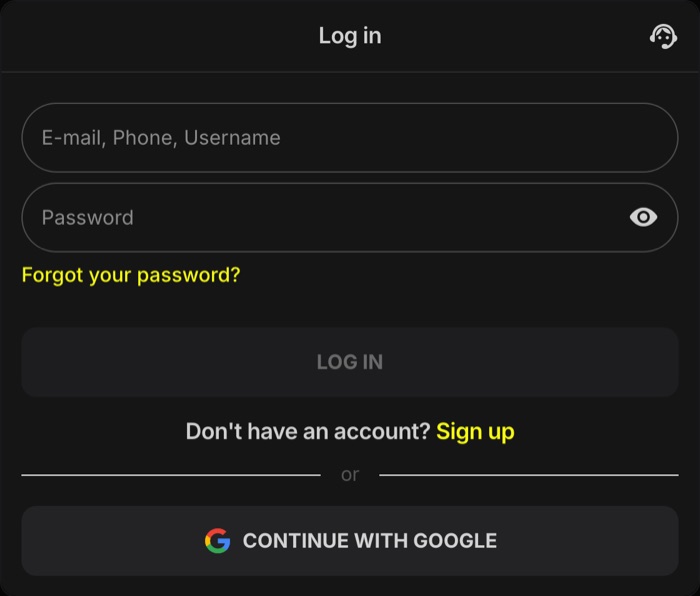
Parimatch offers five ways into an existing account. Three use a password, and two hand the check over to Google or Apple. The right method depends on how the account was opened.
| Method | What to enter | Good to know |
|---|---|---|
| Phone number | 10-digit Indian mobile number after +91 and the password | Use the number from sign-up; an SMS code may be asked on a new device |
| The e-mail address used at sign-up and the password | A password reset code goes to the same inbox | |
| Account ID | The account number (ID) and the password | Useful when the registered phone or e-mail is unavailable |
| One tap on the Google button, then the Google account | Only for accounts opened with Google | |
| Apple | One tap on the Apple button, then the Apple ID | Only for accounts opened with Apple |
Google and Apple accounts. An account created with Google or Apple may not open with a phone-and-password login. If a phone login says the details are wrong, try the Google or Apple button instead.
How to Log In to Parimatch on Any Device
The login steps are almost the same everywhere. Pick the card that matches the device in hand.
Desktop & Mobile Browser
- Open Parimatch in Chrome, Safari or any other browser.
- Click or tap “Log in”.
- Choose phone, e-mail or account ID, or tap Google or Apple.
- Enter the number after +91, the e-mail or the ID, then the password.
- Confirm with the SMS code if asked. The balance and the Deposit button appear in the top right corner.
Android App
- Open the Parimatch app installed from the APK file.
- Accept the update prompt if one appears.
- Tap “Log in” and choose the same method used at Parimatch sign-up.
- Enter the details and the SMS code if requested.
iOS Web App
- Open the Parimatch icon added through Safari → Share → Add to Home Screen.
- Tap “Log in”.
- Use the Apple button for an Apple account, or enter the phone, e-mail or ID with the password.
- Confirm the code if asked. The web app updates itself, so no reinstall is needed.
The mobile version and the app share one account, one balance and the same bet history. Differences between the two are covered on the Parimatch mobile version page, and installation is explained in the Parimatch app guide.
No Parimatch Account Yet? Registration takes about a minute with a +91 number, e-mail, Google or Apple
Create an AccountParimatch Password Reset Step by Step
A lost password is not a reason to open a second account. Parimatch allows one account per person, and multi-accounting voids any bonus. Recover the existing account instead:
- Open the login form. In a browser, on the mobile version or in the Parimatch app.
- Tap “Forgot your password?” The link sits inside the login form.
- Choose how to recover. Phone number, e-mail or account number, whichever belongs to the account.
- Enter the code. A one-time code arrives by SMS or e-mail. Type the code into the recovery form.
- Create a new password. At least 4 characters; a longer mix of letters and digits is much harder to guess.
- Log in again. The new password works in the browser, on the mobile version and in the app.
If no code arrives or the form keeps rejecting the details, the Online Chat answers 24/7 in English and Hindi. Other contact options are listed on the Parimatch support page.
Fixing Common Parimatch Login Problems
Most failed logins come down to a handful of causes. Check the table before writing to support.
| Problem | Likely cause | Fix |
|---|---|---|
| “Wrong password” message | Typo, Caps Lock, a different keyboard language or the wrong login method | Retype slowly, check the method, then use “Forgot your password?” |
| Account locked | Several failed attempts in a row, or a pending KYC check | Stop retrying, contact the Online Chat and finish account verification if asked |
| SMS code does not arrive | DND settings, weak network or a typo in the number | Wait about 60 seconds, make sure DND does not block service messages, then request the code again |
| Code asked on a new phone or laptop | Security check for an unrecognised device | Enter the code sent to the registered number or e-mail |
| Phone login fails for a Google or Apple account | The account was opened through Google or Apple | Log in with the Google or Apple button |
| Page or app does not load | Outdated app, full cache or unstable connection | Update the app, clear the browser cache, switch between Wi-Fi and mobile data |
| Logged out without warning | Automatic logout after a period of inactivity | Log in again with the usual details |
The Parimatch Help Centre also has an article titled “Website or App not Working/Loading Properly”. On Android, installing the latest APK over the old version keeps the account in place, so there is no need to delete the app first.
Account Security Tips for Parimatch Players
A betting account holds money and KYC documents, so a few simple habits go a long way.
- Use a unique password. Never reuse the password from e-mail, UPI apps or social media.
- Never share an OTP or password. Not with friends, tipsters or anyone claiming to help with a withdrawal.
- Keep the phone number and e-mail current. Password recovery codes go only to the contacts saved in the account.
- Log out on shared devices. Office PCs and borrowed phones keep sessions open otherwise.
- Install the APK only through “Download for Android” on Parimatch. Files from forums and file-sharing groups can carry malware.
Support never asks for a password or OTP. Parimatch support does not message first on WhatsApp and does not request login codes in chat. Anyone asking for these details is trying to take over the account.
Account settings also include deposit limits, session reminders, time-outs and self-exclusion. Betting is for adults 18+ only; set limits before the first deposit and read the responsible gambling guide if play stops feeling like entertainment.
What to Do after Logging In
Once inside, the main sections are one tap away. These pages cover the next steps in detail:
Deposit Funds
UPI, PhonePe, Paytm, Google Pay or USDT/USDC, from ₹300 and usually credited within minutes.
KYCComplete Verification
Aadhaar, PAN, passport, driving licence or Voter ID, required before the first withdrawal.
OffersActivate Bonuses
Sports welcome bonus of 150% up to ₹20,000 on the first deposit, plus Daily Free Bets and Daily Free Spins.
PayoutsWithdraw Winnings
UPI, bank transfer or crypto, from ₹500–₹1,000 depending on the method, with no Parimatch fees.
Campaign promo codes from e-mails or social media go into Promotions → Promo code after login. Deposits and bets work straight away, but any active bonus wagering has to be finished before cashing out.
FAQ about Parimatch Login
Can I log in to Parimatch with an account ID instead of a phone number?
Yes. The login form accepts a +91 phone number, an e-mail or the account number (ID), each with the same password.
What should I do if the Parimatch login OTP does not arrive?
Wait about 60 seconds, check that DND does not block service messages and that the number is typed correctly, then request a new code. If the code still does not come, write to the Online Chat.
Is the same Parimatch account used in the app and in a desktop browser?
Yes. One login opens the same balance, bets and bonuses in a desktop browser, on the mobile version, in the Android app and in the iOS web app.
Why is my Parimatch account locked?
A lock usually follows several wrong passwords in a row or a pending verification check. Contact the 24/7 Online Chat and complete KYC if requested.
Will Parimatch support ever ask for my password or OTP?
No. Support does not request passwords or login codes and does not message first on WhatsApp. Treat any such request as a scam.
Do I need to log in again after updating the Android app?
Accepting the update prompt or installing the latest APK over the old version keeps the account. If the login form appears afterwards, the usual phone, e-mail or ID details work.