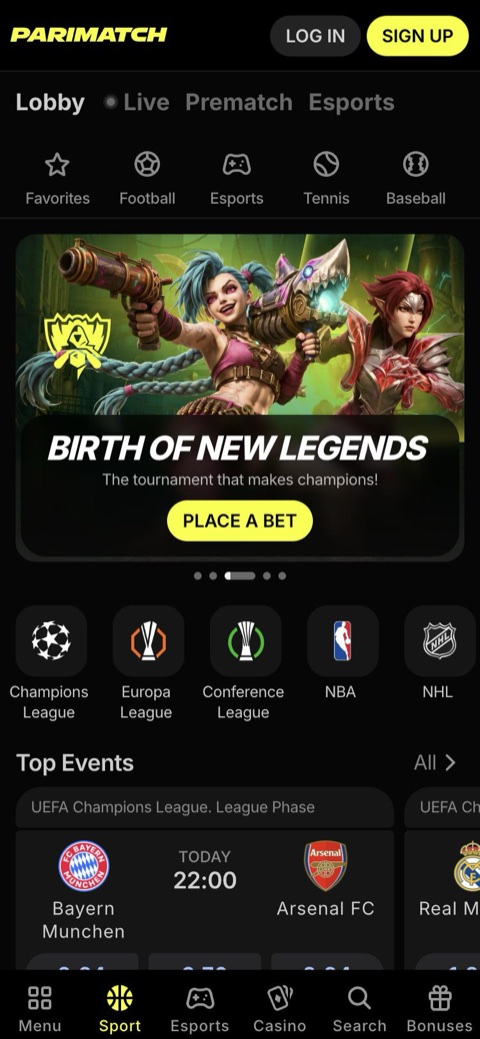
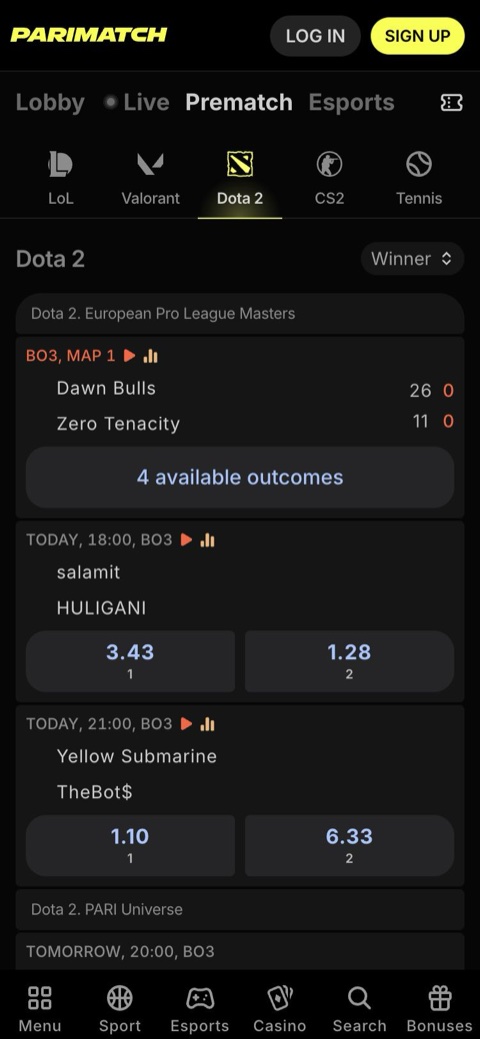

What The Parimatch Mobile Version Is
The Parimatch mobile version is a responsive site: the same address as the desktop version, with the layout rebuilt for a touch screen. Nothing is installed, almost no phone storage is used beyond the browser cache, and the version on screen is always the current one.
| Parameter | Mobile version details |
|---|---|
| Format | Responsive site at the same address as the desktop version |
| Download | Not needed |
| Browsers | Chrome, Safari, Firefox, Opera, Edge or another mobile browser on Android and iOS |
| Account | Same login, balance and bet history as on desktop and in the app |
| Currencies | INR, plus a separate crypto balance in USDT or USDC |
| Languages | English and Hindi |
| Minimum bet | ₹10 |
| Minimum deposit | ₹300 via UPI, PhonePe or Paytm; 10 USDT/USDC in crypto |
| Support | Online Chat 24/7 and Help Centre |
| Age | 18+ |
How to Open Parimatch on Android And iPhone
No special mobile link is needed: the mobile layout loads automatically once Parimatch is opened in a phone browser.
Android: Chrome
- Open Parimatch in Chrome from a trusted bookmark or link.
- Switch between English and Hindi if needed.
- Tap Login, or the yellow Sign up button at the top right for a new account.
- Bookmark the page or add a home-screen icon (steps below).
iPhone And iPad: Safari
- Open Parimatch in Safari.
- Tap Login or Sign up.
- Enter a +91 number, e-mail or account number with the password, or use Apple or Google.
- Bookmark the page or add a home-screen icon (steps below).
Protect the login. Never share a password or SMS code. Parimatch support does not message players first on WhatsApp and does not ask for passwords or OTPs.
New players can follow the full walkthrough on the Parimatch registration page; anyone stuck at the login screen will find fixes in the Parimatch login guide.
Open Parimatch in The Mobile Browser One account for phone, desktop and app
Go to ParimatchWhat Works on The Parimatch Mobile Site
The mobile version is not a cut-down edition: a bet placed on the phone shows up in the same bet history on desktop and in the app.
Pre-Match Betting
25+ sports, from cricket and football to kabaddi, tennis and esports. Singles, parlays and system bets from ₹10.
Live Cricket And More
Hot Matches, ball-by-ball cricket odds, next-wicket markets, Quick Bet and Cash Out on selected markets.
Slots And Live Tables
Slots, Andar Bahar and Teen Patti in Live Casino, Aviator in Instant Games, TV Games and Virtual Sport.
UPI Payments
UPI, PhonePe, Paytm, Google Pay and USDT/USDC, with no fees charged by Parimatch.
BonusesOffers And Promo Codes
Welcome bonus in the sign-up form, Daily Free Bets and the Promotions → Promo code field.
Online Chat 24/7
Chat widget with Help Centre search, in English and Hindi.
Paying from The Phone with UPI
- Open the cashier. Tap Deposit next to the balance at the top right, or open Wallet.
- Choose the method and amount. UPI, PhonePe, Paytm or Google Pay, from ₹300. Pick a bonus if this is the first deposit.
- Confirm in the UPI app. Approve with the UPI PIN and switch back to the browser. For a UPI QR payment, enter the UTR number if asked.
- Check the balance. Deposits are usually credited within a few minutes.
Withdrawals go through Profile or Wallet → Withdraw once verification (KYC) is complete. The minimum Parimatch withdrawal is ₹500–₹1,000 depending on the method, with UPI often at ₹1,000, and UPI payouts usually arrive within 15 minutes to 24 hours.
How to Add Parimatch to The Home Screen
A home-screen icon turns the mobile site into a web app, also called a PWA. Parimatch then opens from the icon like an ordinary app, with no APK to install, and the web app updates itself.
iPhone And iPad: Safari
- Open Parimatch in Safari.
- Tap the Share button.
- Choose Add to Home Screen, then Add.
- Open the new icon and log in.
Android: Chrome
- Open Parimatch in Chrome.
- If an install or Add to Home screen prompt appears, accept it.
- Otherwise, tap the three-dot menu and choose Add to Home screen or Install app.
- Confirm and launch Parimatch from the icon.
On iPhone, the home-screen web app is the main way to use Parimatch like an app, since no App Store app is available in India. Push notifications for home-screen web apps need iOS 16.4 or newer.
PWA Welcome bonus. Parimatch lists a PWA Welcome pack of 400% bonuses, worth up to ₹1,80,000 in rewards. The split and wagering terms are shown only after registration, so read the conditions in the account before depositing.
Parimatch Mobile Site vs App
Both options use the same account and the same balance, so the choice comes down to installation, storage and notifications.
| Feature | Mobile version | Parimatch app |
|---|---|---|
| Installation | None, opens in the browser | Android APK (not on Google Play); Safari web app on iPhone |
| Size on the phone | Almost none, browser cache only | Android APK of around 70–80 MB, about 100 MB once installed; varies by version |
| Device requirements | Any up-to-date mobile browser | Android 5.0+ (6.0+ recommended), 1 GB RAM (2 GB recommended) and 150–200 MB free; iOS or iPadOS 12+ with Safari |
| Updates | Always current | Update prompt or the latest APK over the old one on Android; the iOS web app updates itself |
| Push notifications | Limited or none | Yes; the iPhone web app needs iOS 16.4+ |
| Sportsbook, casino, cashier, chat | Full | Full |
| Languages | English and Hindi | English and Hindi |
| Welcome offers | Bonuses in the sign-up form | Same, plus the PWA Welcome pack of 400% bonuses up to ₹1,80,000 in rewards |
| Cost | Free | Free |
The browser version suits occasional bets and phones short on storage. Players who follow live cricket every day may prefer the app for push notifications; Android APK and iPhone install steps are on the Parimatch app page.
Prefer Push Notifications? Same account and balance in the Parimatch app
Download the AppRequirements And Connection Tips
The mobile version runs in any mainstream mobile browser on Android and iOS, so the real requirement is an up-to-date browser rather than a specific phone model. For the iPhone and iPad web app, most reviews list iOS or iPadOS 12+ in Safari as the minimum, with a current iOS version recommended.
- Android
- iPhone
- iPad
- Chrome
- Safari
- Firefox
- Opera
- Edge
- English
- Hindi
Live betting and Parimatch live casino tables depend more on the connection than on the phone:
- Update the browser. Old versions often cause blank pages and buttons that do not respond.
- Use Wi-Fi or a strong signal for live play. A weak connection delays odds updates and can freeze live dealer video.
- Log in before a big match. A new device may trigger an SMS code, which can delay a last-minute bet.
Fixing Common Problems on The Mobile Site
- The page does not load. Reload, clear the browser cache, switch between Wi-Fi and mobile data or try another browser. The Help Centre also has a dedicated article, “Website or App not Working/Loading Properly”.
- Odds refresh slowly or a live bet is rejected. Live odds change fast, and a slow connection delays updates. Refresh the event page, move to a stronger signal and place the bet again at the new odds.
- The account logs out without warning. Sessions end after a period of inactivity. Log in again, or use “Forgot your password?” to set a new password of 4+ characters if the old one no longer works.
- A UPI payment went through but the balance did not change. Return to the browser and wait a few minutes before paying again. If the balance is still unchanged, contact Online Chat with the payment details from the UPI app.
Online Chat answers 24/7, usually within a few minutes; details are on the Parimatch support page.
18+ only. Set limits before betting. A phone makes a bet possible at any moment, so set daily, weekly or monthly deposit limits, session reminders or a time-out in the account settings. Betting always carries a risk of loss; more tools are explained under responsible gambling.
FAQ about The Parimatch Mobile Version
Do I need to download anything to use the Parimatch mobile version?
No. The mobile version opens in Chrome, Safari or any other mobile browser and needs almost no storage beyond the browser cache.
Is the mobile account the same as the Parimatch app account?
Yes. One login, one balance and one bet history are shared by the mobile site, the desktop version and the app.
Can I register and claim the welcome bonus on the mobile site?
Yes. The sign-up form on a phone is the same, with Sport Bonus +150% up to ₹20,000 or 200 USDT/USDC selected by default. Slots, Live Casino or Instant Games offers can be picked instead; only one welcome bonus is available per person.
Can I deposit and withdraw on the mobile site?
Yes. The same cashier takes UPI, PhonePe, Paytm and Google Pay from ₹300, or 10 USDT/USDC in crypto. Withdrawals open after verification, start at ₹500–₹1,000 depending on the method, and UPI payouts usually take 15 minutes to 24 hours.
Does the Parimatch mobile version work on iPhone?
Yes, in Safari or another browser. Share → Add to Home Screen creates the iOS web app; most reviews list iOS 12+ as the minimum, and push notifications for home-screen web apps need iOS 16.4+.
Does the mobile site send push notifications?
Browser push support is limited or absent. The Android app supports push notifications, and on iPhone a home-screen web app can receive them on iOS 16.4 or newer.