
Parimatch Support Channels
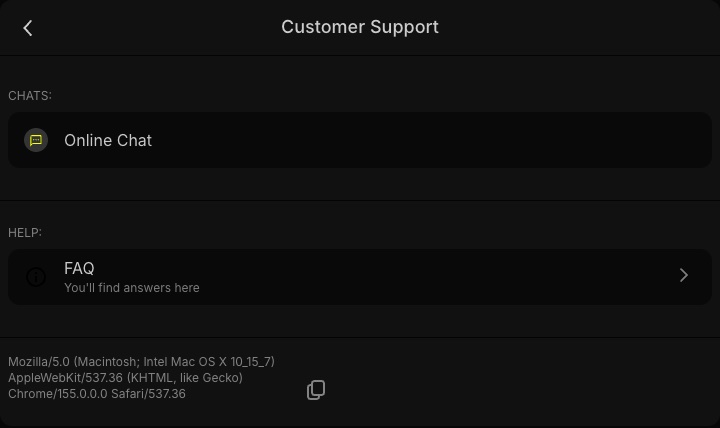
The Customer Support menu on Parimatch has two entries: Online Chat for a conversation with an agent, and FAQ for the self-service Help Centre. Both are available in the desktop version, the mobile version and the Parimatch app.
| Channel | Details |
|---|---|
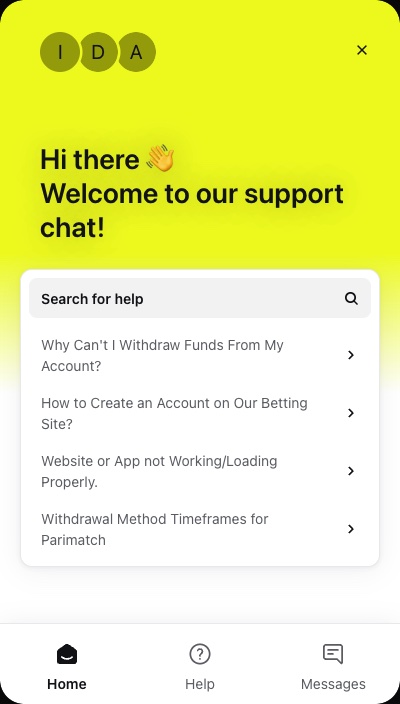
| Online Chat | Chat widget with Home, Help and Messages tabs; bot and live agents |
| Help Centre | FAQ articles, found through “Search for help” |
| Hours | 24/7 for the live chat; articles can be read any time |
| Languages | English and Hindi |
| Usual reply time | Usually a few minutes in the live chat |
Phone numbers, e-mail addresses and WhatsApp contacts that circulate online cannot be checked, so the Online Chat opened from a logged-in account is the reliable route to a genuine agent. Members of the Parimatch VIP Club at higher levels are reported to get priority support.
Home
The “Search for help” field and links to popular Help Centre articles.
Help
The Help Centre: FAQ articles on accounts, payments and access.
Messages
Where a conversation with the bot or an agent starts and continues.
How to Open The Parimatch Online Chat
- Sign in if possible. Open Parimatch in Chrome, Safari or the Parimatch app and log in, so the question is tied to the right account. Access problems are covered on the Parimatch login page.
- Go to Customer Support. Choose Online Chat under Chats. The FAQ entry in the same menu leads straight to the Help Centre.
- Search on the Home tab first. The widget opens on Home. Type a short query such as “withdrawal pending” or “app not loading” into “Search for help”; routine questions often have a ready article.
- Write in Messages. If no article fits, describe the problem in one or two sentences. A bot may reply first; ask for a live agent if the automated answers do not help.
- Share details when asked. Have the account ID, transaction ID and screenshots ready, and keep the chat open until the agent replies.
Online Chat in Your Pocket The Parimatch app keeps the 24/7 chat and Help Centre one tap away
Download the AppParimatch Help Centre Articles
The Help Centre is a searchable FAQ. Four articles shown on the Home tab of the chat match frequent questions from players in India:
| Article | Useful for | Related guide |
|---|---|---|
| “Why Can't I Withdraw Funds From My Account?” | Blocked payouts: pending KYC, unfinished wagering, wrong details | Withdrawal guide |
| “Withdrawal Method Timeframes for Parimatch” | Expected payout time for UPI, bank transfer and crypto | Withdrawal guide |
| “How to Create an Account…” | Sign-up steps and choosing a welcome bonus | Registration guide |
| “Website or App not Working/Loading Properly” | Pages that do not open, a frozen app, blank screens | App guide, mobile version guide |
Articles answer instantly, so a quick search often saves a wait. If the article does not solve the problem, the Messages tab is one tap away.
What to Prepare before Contacting Support
Agents look up accounts and payments by ID, so a clear first message means fewer follow-up questions.
- Account ID. The account number that also works as a login, plus the registered +91 number or e-mail.
- Transaction ID. Taken from Transaction History. For a UPI deposit, add the UTR number from the UPI app.
- Amount, method and time. The sum, the app used (PhonePe, Paytm, Google Pay) and the exact date and time.
- Screenshots. The error, the successful payment screen or the pending request, ready if the agent asks.
- Device. Browser, Android APK or iOS web app.
Deposit Not Credited
- Wait a few minutes after the UPI payment.
- Enter the UTR in the cashier if a field is shown.
- Send the UTR, amount and payment screenshot to the chat.
Withdrawal Pending
- Check KYC status and active bonus wagering.
- Confirm the UPI ID or bank account and IFSC.
- Send the transaction ID from Transaction History.
Parimatch Support Response Times
A live agent usually replies within a few minutes, though the help search or bot may come first and waits can be longer at busy times. Many questions concern a payment or check that simply needs more time, so the usual durations below show when a message is worth sending.
| Situation | Usual time | When to write to support |
|---|---|---|
| Live chat reply | Usually a few minutes | Any time, 24/7 |
| UPI, PhonePe or Paytm deposit | Instant, usually within minutes | Payment successful but balance unchanged |
| Crypto deposit | Instant to around 30 minutes after network confirmation | Confirmed on the network, still missing |
| UPI withdrawal | 15 minutes to 24 hours; the first one may take the full 24 hours | Still pending after 48 hours |
| Bank transfer withdrawal | 1–3 working days | Outside the usual window |
| Crypto withdrawal | Minutes to around 12 hours | Outside the usual window |
| KYC check | A few hours, up to 24 hours; up to 48 hours in busy periods | Still pending after 48 hours |
| SMS or OTP code | Wait about 60 seconds before a resend | No code after a resend and a DND check |
These times are typical, not guaranteed, and may vary by account, method and bank. Payment steps and limits are covered in the Parimatch deposit guide, and document checks on the verification page.
Support Languages: English And Hindi
- English
- Hindi
The Online Chat works in English and Hindi, the same two languages as the Parimatch interface. Either works for any topic; short messages with exact amounts, dates and IDs get resolved faster than long explanations.
Common Support Questions And Where to Find Answers
Most chat requests repeat a handful of topics. Each card leads to a guide with the steps agents usually suggest first.
Withdrawal Pending Or Rejected
Methods, minimums of ₹500–₹1,000 and fixes for blocked payouts.
AccountCannot Register
Missing SMS codes, a number already in use, a form that will not load.
AppApp Not Loading
Accept the update prompt or install the latest APK over the old one, then clear the cache.
AccessLogin And OTP Problems
Password reset through “Forgot your password?” and locked accounts.
KYCVerification Stuck
Aadhaar, PAN and name mismatches between Personal Data and ID.
PaymentsUPI Deposit Issues
UPI, PhonePe and Paytm payments, UTR numbers and the ₹300 minimum.
No Account Yet? Pick a welcome bonus right in the sign-up form
Create an AccountHow to Spot Fake Parimatch Support
Genuine support never writes first on WhatsApp and never asks for a password or OTP. A UPI PIN should never be shared with anyone. Any message asking for these details is a scam, whatever logo appears on the profile.
Common warning signs:
- An unexpected WhatsApp, Telegram or SMS message from “Parimatch support” about a Parimatch bonus or a stuck withdrawal.
- A request to install a screen-sharing app or read out an SMS code.
- An offer to unlock a withdrawal for an upfront fee paid to a personal UPI ID. Parimatch charges no fees on deposits or withdrawals.
- A link to a page that copies the Parimatch login form.
If something was already shared, stop replying, change the password through “Forgot your password?” and report the contact in the Online Chat from the account.
Limits, Time-Outs And Self-Exclusion
Support also handles responsible-gambling requests. Deposit limits (daily, weekly or monthly), session limits and reminders, and time-outs sit in the account settings, while temporary or permanent self-exclusion can be set there or requested through the Online Chat.
Betting is for adults 18+ only and never a way to earn money. Independent help is available from Tele-MANAS, the Government of India helpline on 14416; more tools and contacts are on the responsible gambling page.
FAQ about Parimatch Support
Is Parimatch customer support available 24/7?
Yes. The Online Chat answers around the clock, and Help Centre articles are open at any hour.
Does Parimatch support have a WhatsApp number or phone line?
The support channels in the account are the 24/7 Online Chat and the Help Centre. Numbers shared on WhatsApp or social media cannot be verified, and genuine support never writes first on WhatsApp, so treat such messages as a scam.
How fast does Parimatch support reply?
A live agent usually replies within a few minutes. The bot or help search may answer first, and waits can be longer at busy times.
Can I talk to Parimatch support in Hindi?
Yes. The Online Chat works in English and Hindi.
What should I send support about a missing UPI deposit?
The UTR number, amount, payment app, date and time, plus a screenshot of the successful payment. Never send a password, OTP or UPI PIN.
When should I contact support about a pending withdrawal?
UPI withdrawals usually take 15 minutes to 24 hours and bank transfers 1–3 working days. If a request is still pending after 48 hours, send the transaction ID from Transaction History to the Online Chat.